
Appearance
Register a Device
WARNING
Support for the WebAccess/DMP platform is limited for the S1 Router version.
Device registration creates a device record in the system.
In most cases (Cloud deployment), devices are already present in the manufacturing database and only need to be added to your company.
Registration is required mainly for On-Premises deployments or in exceptional cases.
When Is Registration Required?
Device registration is required only if:
- You are using an On-Premises deployment
- The device cannot be claimed using the standard Add Device process
- You were instructed by support to register the device manually
If you are using the Cloud instance and the device cannot be added, contact
wadmp@advantech.com and include:
- Serial Number
- MAC Address
- IMEI (if applicable)
- Device Type
- Screenshot of the error message
Registering a Device (Cloud)
In Cloud deployments, the Register Device tab should only be used if the device is not available in the manufacturing database or if instructed by support.
- Navigate to the Dashboard.
- Click the Add (plus) icon above the device table.
- Open the Register Device tab.

- Enter the required device information.
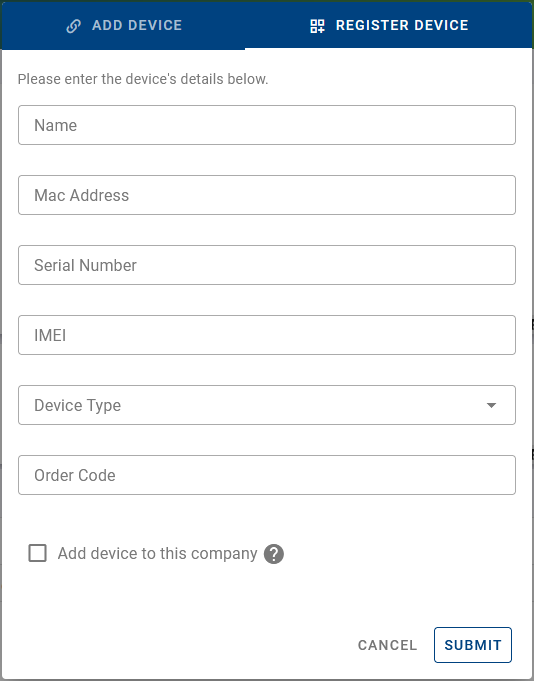
- Click Submit.
Register Device Form Fields
Name (Optional)
A human-readable name for the device. Can be changed later.MAC Address (Required)
MAC address of the device’s primary network interface.
Format example:00:11:22:AA:BB:CCSerial Number (Required)
The exact serial number as printed on the device label.IMEI (Optional)
Required only for cellular devices.Device Type (Required)
Select the correct hardware model.Order Code (Optional)
Internal or purchase reference. Does not affect functionality.Add device to this company
- If checked → The device is registered and immediately added to the current company.
- If unchecked → The device is only registered and must be added later using Add Device.
Registering a Device (On-Premises)
In an On-Premises deployment, devices must be registered before they can be added to the system.
This is required because On-Premises installations do not have access to the manufacturing database used in the Cloud instance.
Registration Procedure
- Navigate to the Dashboard.
- Click the Add (plus) icon above the device table.
- Open the Register Device tab.
- Enter all required device information.
- Click Submit.
If the Add device to this company option is enabled, the device will be registered and immediately added to the current company.
Register via API (Optional)
Devices can also be registered programmatically using the dedicated device registration endpoint in the API.